

Appearance
Webhook Integration (Pro)
The Webhook integration lets you send email leads captured by FluentPlayer to any external HTTP endpoint in real time. It is useful when you want to connect FluentPlayer with tools that do not have a native integration.
Pro feature
Webhook integration requires FluentPlayer Pro.
How It Works
Webhook integration connects your email capture overlay to any external system that accepts HTTP requests. You configure endpoints once in WordPress, then choose which endpoint each video should use.
- FluentPlayer (free) installed and active.
- FluentPlayer Pro installed and active.
- A valid webhook endpoint URL from your external service.
- WordPress 6.0+ and PHP 7.4+.
WARNING
The Pro plugin depends on the free FluentPlayer plugin. Keep both active.
Requirements
Before you start, confirm you have:
- FluentPlayer collects the submission.
- The selected email provider is triggered.
- If Webhook is selected, a request is sent to your configured endpoint.
- Your external service receives and processes the data.
Enable the Webhook Provider
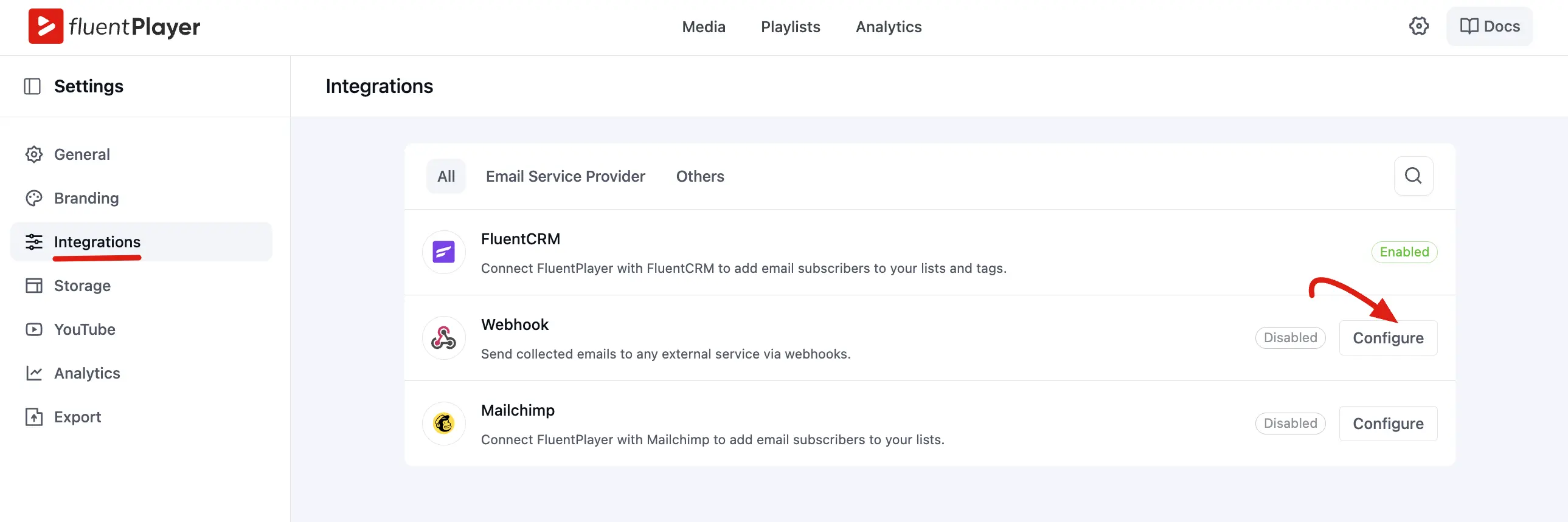
- Go to FluentPlayer → Settings.
- Open the Integrations tab.
- Find Webhook and click Configure.
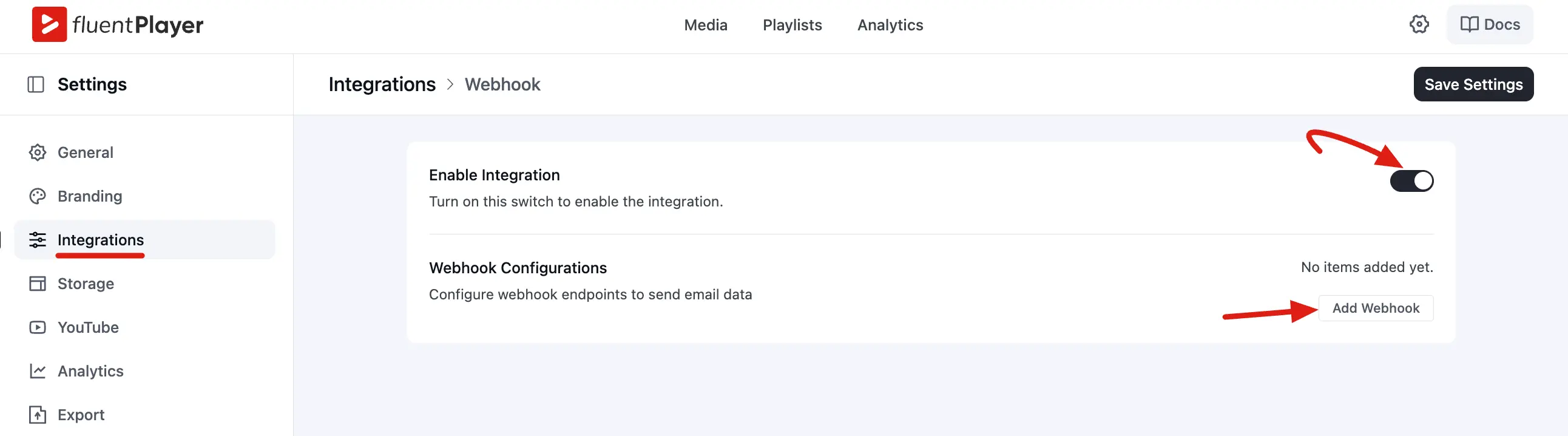
- Turn Enable Integration on.
Add a Webhook Endpoint
- Click Add Webhook.
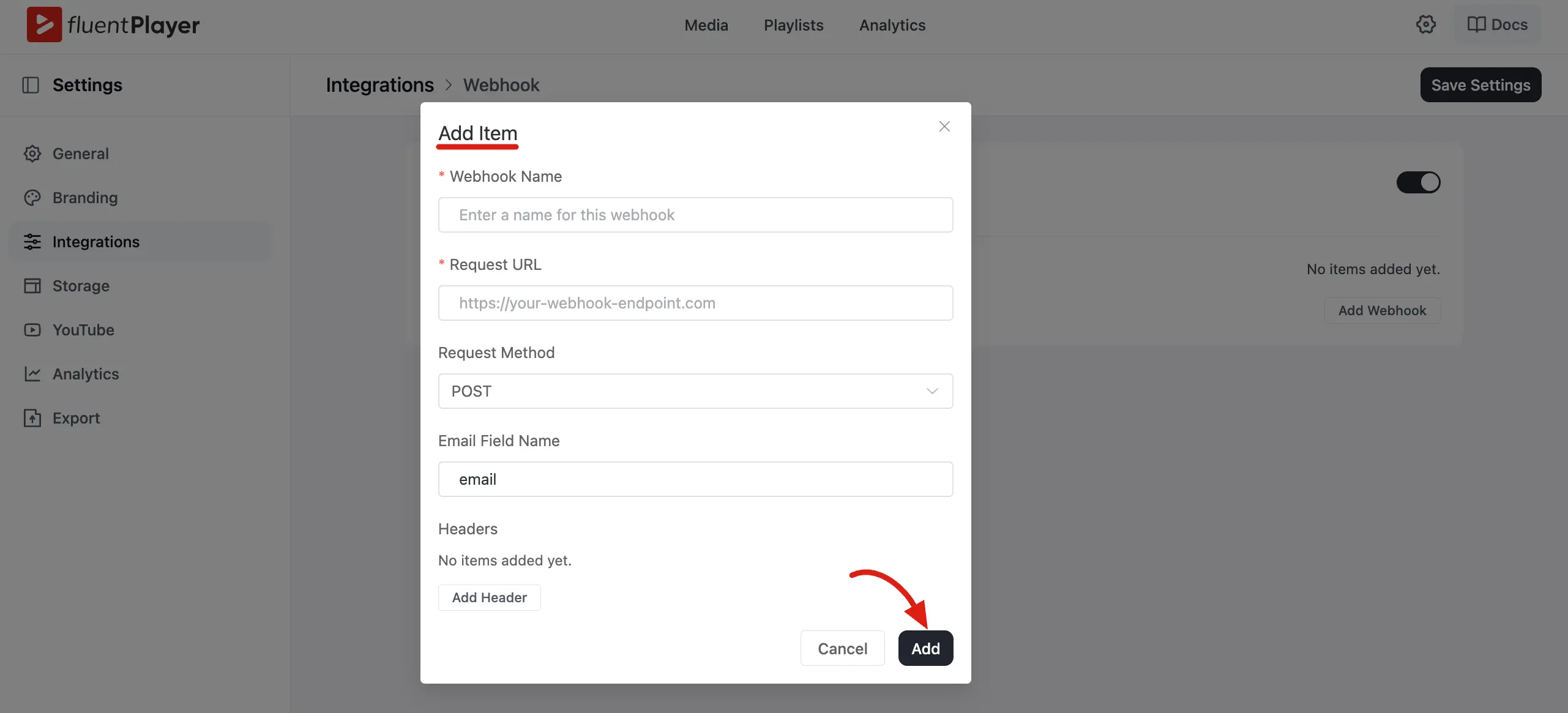
- Fill in the fields:
| Field | Description |
|---|---|
| Webhook Name | Friendly label (for example, Course Leads) |
| Request URL | Full destination URL (https://...) |
| Request Method | GET, POST, or PUT — POST is recommended |
| Email Field Name | JSON or query key for the email value (default: email) |
| Headers (Optional) | Custom headers for authentication or metadata |
- Click Add, then Save Settings.
INFO
When adding custom headers, fill in both Header Name and Header Value. Empty header rows trigger a validation error. You can save multiple webhook endpoints and route different videos to different targets.
Request Methods (Reference)
| Method | Behavior |
|---|---|
POST | Sends a JSON payload with Content-Type: application/json |
PUT | Same JSON payload as POST, using the PUT method |
GET | Sends data as URL query parameters (no request body) |
See What your endpoint receives above for typical payload fields.
Assign Webhook to a Video
Global webhook setup and per video routing are configured separately.
- Open a media item under Fluent Player → Media (or the preset that should use the webhook).
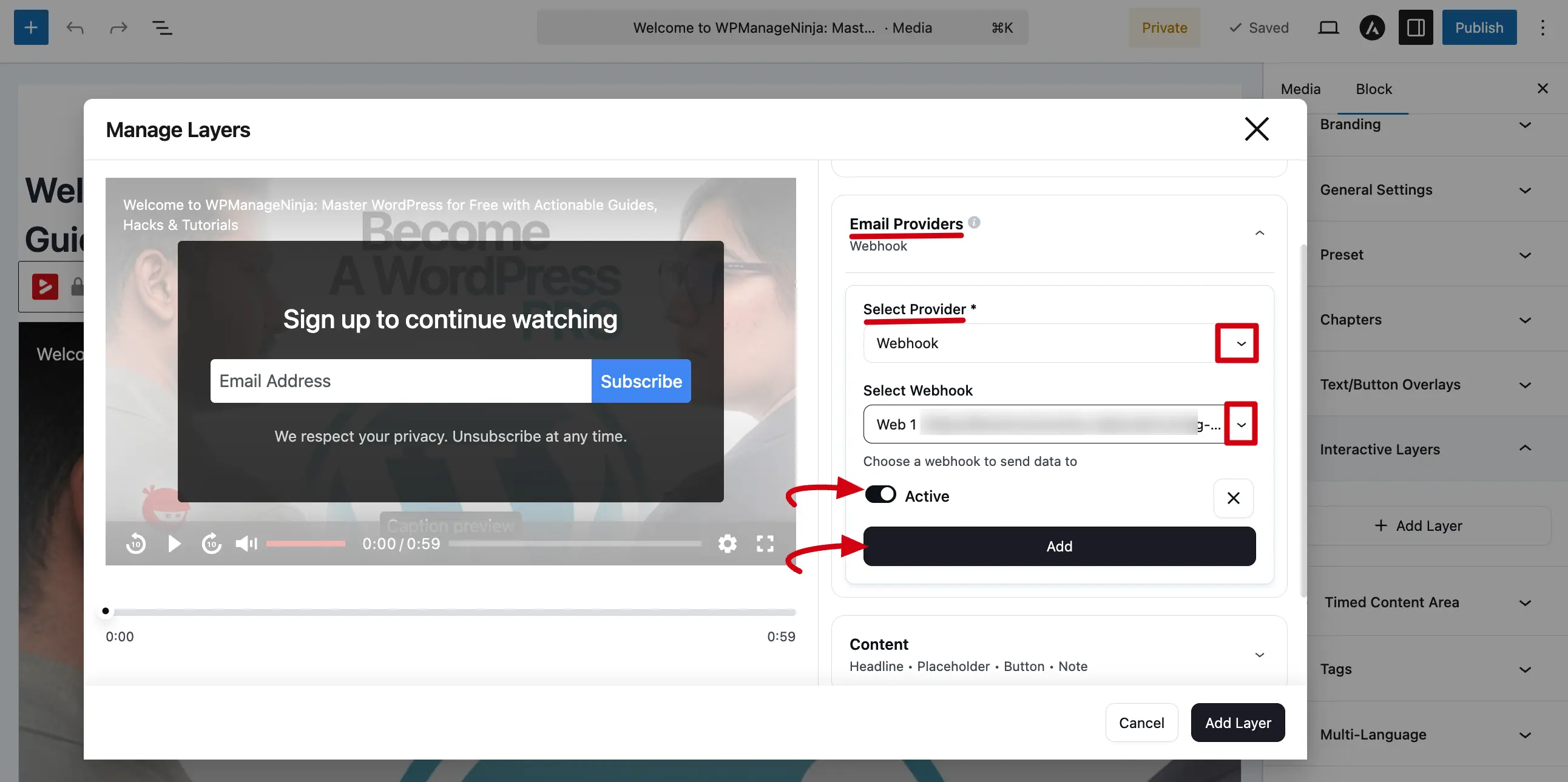
- Go to Email Capture / Email Provider settings.
- Select Webhook as the provider.
- Choose the endpoint from Select Webhook.
- Save the media item or preset.
If Select Webhook is empty, return to Settings → Integrations → Webhook and confirm at least one endpoint is saved and integration is enabled.
Security Notes
Webhook requests use built in validation and sanitization:
- URL validation before save and send
- Allowed methods limited to
GET,POST, andPUT - Header names normalized before transmission
- Unsafe or invalid endpoints can be rejected
WARNING
If you use authentication headers, avoid high privilege credentials. Use scoped API keys whenever possible, and always prefer HTTPS endpoints in production.
Troubleshooting
| Problem | Likely cause | What to do |
|---|---|---|
| Webhook does not fire | Provider disabled or not assigned to the video | Turn on Webhook under Integrations and select it in Email Provider settings for that media |
| Select Webhook list is empty | No saved endpoints | Add at least one webhook and click Save Settings |
4xx or 5xx response | Endpoint rejected the request | Check URL, method, headers, auth, and expected payload format in your service logs |
| Invalid URL error | Malformed endpoint | Use a full http:// or https:// URL |
| One webhook fails, others succeed | Partial failure across multiple endpoints | Fix the failing target; remaining webhooks are still attempted |
TIP
Webhook delivery runs during the email capture flow with a 15 second timeout. If your endpoint is slow, accept the request quickly and process it asynchronously on your server or through a queue.
Frequently Asked Questions
Can I send data to more than one webhook per video? Each video targets one webhook at a time. Create multiple endpoints in global settings and assign different videos to different webhooks. To fan out one submission to several services, use a relay endpoint (for example, a multi step Zapier Zap) that distributes data on the receiving side.
Is the webhook sent synchronously? Yes. The request runs during email collection. If it times out or fails, the error is logged and any other configured webhooks are still attempted.
What happens if my endpoint is temporarily unavailable? FluentPlayer Pro does not retry failed deliveries automatically. If your endpoint is down at the time of a submission, the delivery will fail and be logged. Consider adding retry logic on your endpoint side or using a queuing service as an intermediary.
Does the webhook work alongside FluentCRM or Mailchimp? Each video uses one active email provider at a time (FluentCRM, Mailchimp, or Webhook). Assign different providers to different videos. To send the same lead to FluentCRM and an external tool, use a FluentCRM automation to forward new contacts.
Can I use HTTP instead of HTTPS? HTTP may be accepted in testing, but use HTTPS in production so email data is encrypted in transit.
Related pages
- Email Providers — overview of every provider you can connect
- Mailchimp Integration — a native option if you use Mailchimp