

Appearance
Embed with Shortcode
The shortcode is the quickest way to put a FluentPlayer video on your site. Paste one line, and the player appears exactly where you put it — in a post, a page, a widget, a page builder, or a theme template.
Start here
Add this to any post or page:
[fluentplayer id="129"]Swap 129 for your own media ID, and you're done. That one line covers most of what people need — everything below is for when you want something more specific.
Find your shortcode
FluentPlayer writes the shortcode for you.
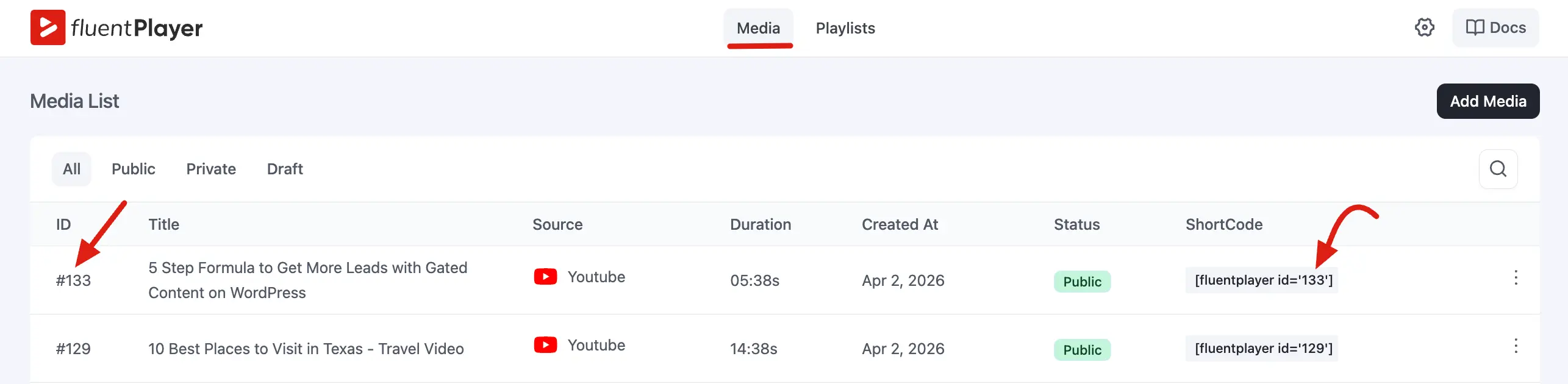
- Go to FluentPlayer → Media.
- Find your video in the Media List table.
- The ID (for example,
#129) is at the start of the row, and the ready-made ShortCode sits in its own column. - Copy it exactly as shown.
Which form do you need?
The id is optional. The shortcode will render a player as soon as it can work out which video to play — from a saved media item, or from a URL you hand it directly.
| If you want to… | Use this |
|---|---|
| Play a video you saved in FluentPlayer → Media | [fluentplayer id="129"] |
| Play a URL with no media item at all | [fluentplayer source_url="https://example.com/talk.mp4"] |
| Wrap many different videos in one player design | [fluentplayer video_id="12" source_meta="video_url"] |
If a shortcode has no id, no video_id, and no source it can resolve, nothing is rendered — the page simply looks as though the shortcode were not there.
Change how the player looks and behaves
Every setting on your media item can be overridden right in the shortcode, for that one embed only. Your media item and your presets are never modified, so the same video can look one way on your homepage and another way in a course lesson.
text
[fluentplayer id="129" preset="minimal" ratio="16:9" start="90"]
[fluentplayer id="129" autoplay="muted" controls="0" class="hero-video"]The first line uses the Minimal preset, forces a 16:9 frame, and starts 90 seconds in. The second gives you a silent, chrome-free hero video you can style with your own CSS class.
All the options
Everything here is optional. Mix and match as many as you like.
| Attribute | Accepts | What it does |
|---|---|---|
preset | A preset slug or its display name — built-in or your own | Applies that preset as the player's design. See Using a custom preset. |
autoplay | true, muted, or preview | true plays with sound, muted uses Muted Autoplay, and preview uses Muted Preview. |
muted | true | Starts the video muted. |
loop | true | Restarts the video when it reaches the end. |
plays_inline | true | Plays inline on mobile instead of opening the fullscreen player. |
preload | none, metadata, or auto | How much the browser loads before playback starts. |
ratio | W:H, for example 16:9 (alias: aspect_ratio) | Sets the player's aspect ratio. |
controls | 0 | Hides the top, center, and bottom control bars. |
start | Whole seconds, for example 90 | Starts playback at that point in the video. |
class | One or more CSS classes, separated by spaces | Added to the player's wrapper so you can style it yourself. |
Saying yes and no
For the on/off attributes, write 1, true, yes, or on. Anything else — including 0, no, and false — counts as off.
If an attribute seems to do nothing, check the spelling of its value. FluentPlayer quietly ignores anything it cannot make sense of (preload="fast", ratio="0:0", a preset name that does not exist) and keeps the saved setting instead. Nothing breaks, but nothing changes either.
Using a custom preset (Pro)
preset is not limited to the seven built-in presets — any custom preset you have made works the same way. Call it by its slug or by its name:
text
[fluentplayer source_meta="f_player_url" preset="audio-preset"]
[fluentplayer id="129" preset="Audio Preset"]Both lines target the same preset. A preset's slug is just its name in lowercase with spaces turned into hyphens, so Audio Preset becomes audio-preset. Type whichever form you find easier — capitalisation does not matter, and you never have to go hunting for the slug.
The built-in slugs are default, course (Modern), simple, standard, floating, minimal, and ambient (Pro). Modern is the only one where the name and the slug differ, so preset="Modern" is the safer thing to type if course slips your mind.
Which setting wins
When the same setting is defined in more than one place, the last one in this list wins:
- The preset — the starting point for the design.
- The media item's own settings — anything you changed on the media itself.
- The shortcode attributes — always the final word.
TIP
Change the video source, poster, or preset on a media item and every page that embeds that ID updates on its own. You never have to go back and edit the pages.
One thing to watch
Adding any source or playback attribute switches the shortcode to a player-only render, so Timed Content blocks attached to that media will not appear. class on its own is the exception — it keeps Timed Content working. If a media item relies on Timed Content, embed it with a plain [fluentplayer id="…"].
Play a video without a media item
Sometimes you just want a video on a page and nothing more — no library entry, no setup. Give the shortcode a source and a preset, and it builds a player on the spot:
text
[fluentplayer source_url="https://example.com/talk.mp4" preset="modern"]
[fluentplayer source_meta="f_player_url" preset="audio-preset"]Nothing is created in FluentPlayer → Media; the player exists only on that page. Because there is no media item to inherit from, the design comes from the preset attribute — a built-in preset or one of your own, as in the second line. Leave preset out and the player falls back to your site's default preset from Settings → General, and you can still shape it with ratio, controls, start, and the rest.
What you give up
Anything that lives on a media item needs a media item. A player with no ID has no chapters, subtitles, overlays, interactive layers, or Timed Content, and it will not show up in your analytics reports. If you need any of those, create a media item and use id — or keep a media item as your design template with video_id, described next.
Dynamic media source (advanced)
source_url and source_meta let a shortcode play a video that is not the one saved on the media item. That is how you build one player design and point it at a different video on every page.
When more than one source is available, the first match wins:
source_url— an explicit URL passed on the shortcode.source_meta— a custom field on the current post (the post or page where the shortcode appears).- The media item's saved source — the default when you provide neither.
One design, many videos
Say every post on your site stores its video URL in a custom field called youtube_url, and you want them all to look the same.
- In FluentPlayer → Media, create one media item and set up the preset, controls, overlays, and branding you want. This item is your reusable template — the source you give it is only a fallback and does not need to match any particular post.
- Copy its ID, for example
#12. - In each post — or once in your theme template — add:
text
[fluentplayer video_id="12" source_meta="youtube_url"]Every post now renders the same player but plays the URL from its own youtube_url field. You reuse the same video_id everywhere; you do not create a media item per video.
id works here too and behaves identically. video_id simply makes it obvious to the next person reading the shortcode that the media is a template, not the video. If you pass both, id wins.
You can combine the source attributes freely:
text
[fluentplayer video_id="12" source_meta="youtube_url" source_poster="https://example.com/cover.jpg"]source_url and source_meta accept YouTube, Vimeo, and direct video or audio files, including .m3u8 streams — the provider is worked out from the URL. source_poster swaps in your own thumbnail.
Security note
source_meta reads a custom field on the post being displayed, and the URL it finds is written into the page — so point it only at fields you control. Protected fields (names beginning with _) are ignored unless a developer opts them in, as are field names containing unusual characters.
Developer note
By default source_meta reads from the post being displayed. Which post it reads from, and the resolved source itself, can both be changed with filters — see the Hooks Reference. There is no post_id shortcode attribute.
Open the video in a lightbox (Pro)
To show a button or thumbnail that opens the video in a popup — rather than putting the player on the page — use [fluentplayer_modal]:
text
[fluentplayer_modal id="129" text="Watch the demo"]The video is not loaded until someone clicks, which keeps the page light. See Lightbox Embed (Pro) for the full set of options.
Using the Shortcode in Different Areas
In a post or page (block editor)
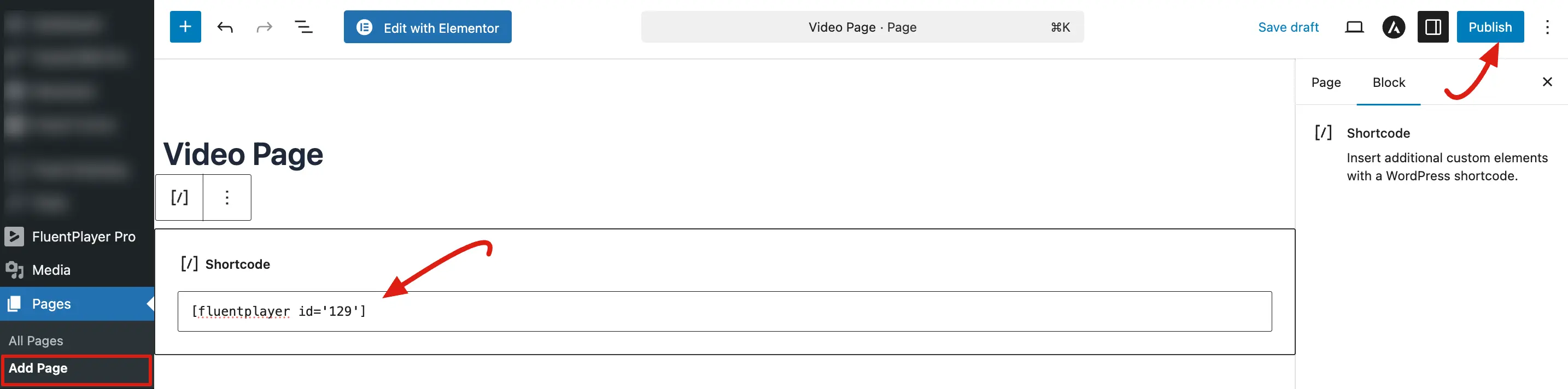
- Go to Pages → Add New, or edit an existing page.
- Click the + icon and search for the Shortcode block.
- Paste your shortcode — for example
[fluentplayer id="133"]— into the box. - Click Publish or Update to see it live.
In a widget
- Go to Appearance → Widgets.
- Add a Text or Custom HTML widget to your sidebar or footer.
- Type
[fluentplayer id="133"]into it. - Save.
In a page builder
Most builders have a Shortcode (or Text/HTML) element — drop your shortcode in and the player renders. Breakdance goes one step further and shows the live player right on the builder canvas, so you can see it while you design. Breakdance is shortcode-only by design: there is no FluentPlayer element or settings panel to go looking for. Add a Shortcode element containing [fluentplayer id="133"] and that's it.
Elementor and Divi 5 get dedicated widgets with full player settings instead — see Elementor Widget and Divi 5 Module.
In a theme template (PHP)
If you are comfortable editing template files, call the player directly:
php
<?php echo do_shortcode('[fluentplayer id="133"]'); ?>Legacy query-string embed
Adding ?fluent_player_media_id=<ID> to a URL on your site replaces that page with FluentPlayer's standalone player page for that media. It is kept for backward compatibility only, and because it takes over the whole page it is not a way to place a player inside your content. For anything new, use the shortcode, the Gutenberg block, or a dedicated player URL.
Common questions
Do I still need a media ID?
No. id is optional — a shortcode with source_url or source_meta renders a player on its own. Use a media item when you want chapters, subtitles, overlays, layers, or analytics; use an ID-less shortcode for a quick one-off video.
Can I put several videos on the same page?
Yes, one shortcode each:
[fluentplayer id="129"]

[fluentplayer id="133"]The same video can also appear twice on a page — each copy plays independently.
Can I use the shortcode inside a tab or accordion?
Yes, as long as the tab or accordion plugin supports shortcodes. Most do.
Nothing appears on my page. What went wrong?
Almost always a media ID that doesn't exist — check it against your Media List. FluentPlayer never shows an error to visitors; the page just looks as though the shortcode were not there. The same happens when a shortcode has no id, no video_id, and no source to fall back on.
If the media does exist but the visitor isn't allowed to see it — a draft or pending item, for instance — they get a short notice in place of the player rather than a broken embed.
Will an attribute break my player if I get it wrong?
No. An unrecognised value is ignored and the saved setting stays in charge, so a typo shows up as "nothing changed" rather than a broken page.