

Appearance
Smartcodes and Personalization
Smartcodes let you create a personalized viewing experience by dropping dynamic placeholders into the player’s text elements. When the page is viewed, FluentPlayer replaces each placeholder with real data—such as the viewer’s name, the site name, or the current date.
Free vs Pro
The user, site, date, and media smartcode groups work in the free plugin. The contact group pulls data from FluentCRM and is only available when FluentCRM is installed (the deeper CRM personalization is part of the Pro/CRM experience).
What are Smartcodes?
Smartcodes are dynamic placeholders (merge tags) that look like double braces, such as {{user.display_name}} or {{contact.first_name}}. When a logged-in user or a known contact views your video, FluentPlayer automatically replaces these tags with the matching data (from the WordPress user, the site, or—if available—their FluentCRM profile).
Where to Use Smartcodes
You can insert Smartcodes into several areas of the player to engage your audience:
- Video Titles: Create a personalized welcome by adding a name to the title overlay.
- Interactive Layers: Use them inside CTA buttons or Text Overlays (e.g., "Hey
{{contact.first_name}}, check this out!"). - Email Capture: Pre fill or personalize the message on your lead generation forms.
- Timed Content: Display personalized instructions or notes in the area below the player.
How to Configure Personalization
1. Connect FluentCRM
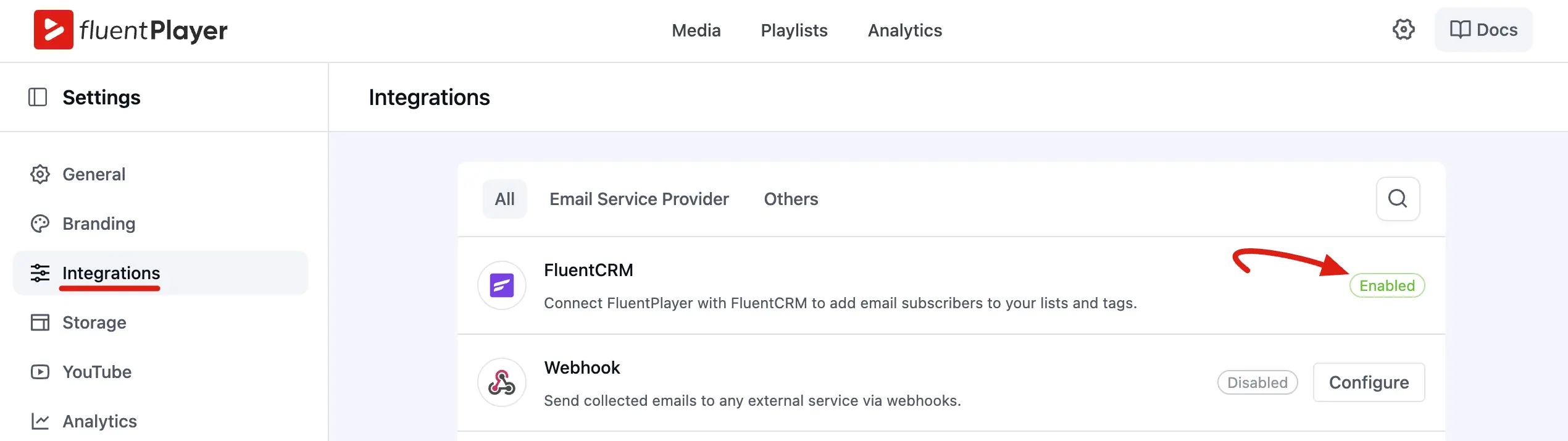
- Go to FluentPlayer Pro → Settings → Integrations.
- Locate the FluentCRM card and ensure it is Enabled.
NOTE
Since FluentCRM is WordPress native, no API keys are required.
2. Insert Smartcodes in the Editor
- Open your video in the Media editor.
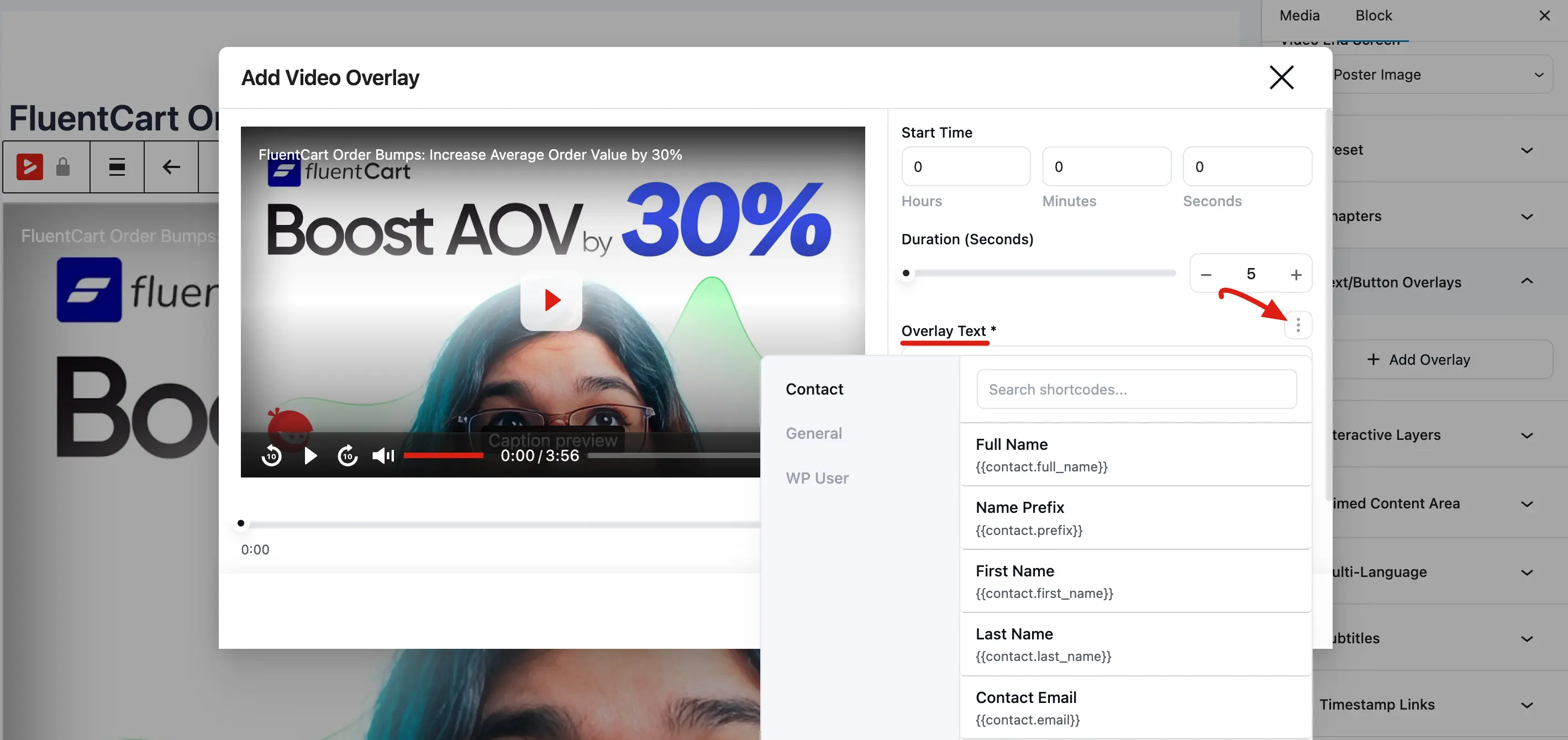
- In the Block tab, look for any text field like Title Overlay or Overlay Text/Button.
- Click the Tag icon (three dot) next to the text field to open the Smartcode selector.
- Choose the data you want to display (e.g., Display Name, First Name, Email).
3. Test the Experience
- Log in to your site as a test user that exists in your FluentCRM contact list.
- View the page containing your video. The placeholders should now show your actual contact details.
Available Smartcode Examples
Free smartcodes (no FluentCRM required):
| Data Type | Smartcode |
|---|---|
| Display Name | {{user.display_name}} |
| First Name | {{user.first_name}} |
| Email Address | {{user.email}} |
| Site Name | {{site.name}} |
| Current Date | {{date.now}} |
| Media Title | {{media.title}} |
The free user group includes display_name, first_name, last_name, email, login, id, and role.
FluentCRM smartcodes (require FluentCRM):
| Data Type | Smartcode |
|---|---|
| First Name | {{contact.first_name}} |
| Email Address | {{contact.user_email}} |
| Full Name | {{contact.full_name}} |
Important
Smartcodes only work for identified visitors (logged in users or those who have previously submitted a form). Anonymous visitors see the fallback (default) text. The contact tags also require the viewer to exist in FluentCRM.
Smartcodes take your video marketing to the next level by making every viewer feel seen. Whether you are greeting a student in a course or offering a personalized deal to a lead, this integration helps build a stronger connection with your audience.